007.2: Collected Words
- Status: Accepted
- Date: 2026-10-24
- Author(s): João V. Farias
Context
Adding and editing multi-line quotes, authors, sources, and dates in the local JSON quote databases (~/storage/desktop/quotes/*.json) via the terminal requires typing verbose Nushell array flags (quotes add [...] --sources [...] --authors [...] --time (...) --database ...). The Collected Words sub-view replaces manual CLI entry with keyboard-friendly Save a quote and Edit quote views backed by ~/.config/nushell/scripts/quotes.nu.
Interaction Flow
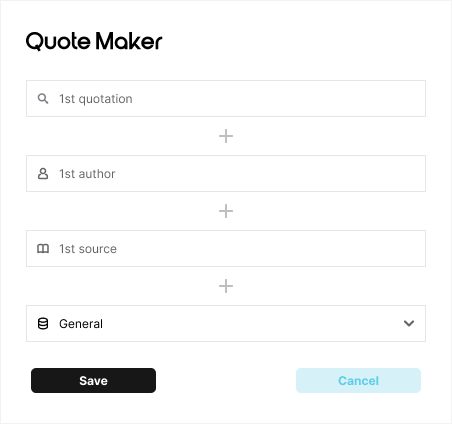
Save a Quote (133:264)
- Open the launcher (
Meta + D) and select Collected Words (or typequote/wordsand pressEnter). - Enter the first quotation line in the
1st quotationinput field. Long lines wrap automatically and expand the row height. - Press
Enterinside a quotation, author, or source field (or click its+button) to append a2nd,3rd, etc. row for multi-line quotes or multiple authors/sources. - Press
Backspaceon an empty additional row (or click×) to remove it. - Optionally enter a creation date (
Date (YYYY-MM-DD, optional)) and select the target database (General,Personal,TV,Books,Music, orStory). - Press
Ctrl + Enteror click Save to executequotes addvia Nushell. On success, the form resets and displays confirmation feedback. Clicking Cancel resets all fields, and pressingEscreturns to the launcher root view.
Edit a Quote (142:72)
- Select an existing quote from the Collected Words list to open the Edit some quote form pre-populated with its quotation lines, authors, sources, date, and database.
- Modify any field, append new rows via
+, or remove rows. - Click Save changes (
Ctrl + Enter) to update the entry in its JSON database, or click Delete quote to remove it.
Visual Design
Designed in Figma (Desktop -> Features -> section 133:263 Collected Words, containing frames 133:264 Save a quote and 142:72 Edit quote):
Implementation
- Source File: Implemented in
source/quote-maker.qml. - Databases (
~/storage/desktop/quotes/): general.json(General)personal.json(Personal)tv.json(TV)books.json(Books)music.json(Music)story.json(Story)- Execution (
Quickshell.Io.Process): Serializes non-emptywords,authors,sources, optionaltime, anddatabasepath intoQUOTE_PAYLOADand invokesnu -c "use ~/.config/nushell/scripts/quotes.nu; ...". Emptyauthors,sources, ortimefields passnullto match the schema ofquotes.nu.